
Edit Widget
Edit widget allow your end users to add, delete, and update features in the source data. It allows the users to edit, including move, scale, rotate geometries, and vertices editing. You can choose the fields to display, organise the fields in collapsible groups with meaningful headings, and provide instructions for editing each field.
Using the Edit Widget
Select and open the Edit widget in the viewer toolbar. The following tools appear under Edit features:

Pan — Click and drag to pan the map.
Select by point — Click the map to place a point and select intersecting features.
Select by rectangle — Click and drag to draw a rectangle and select intersecting features.
Select by lasso — Click the map to create the vertices of a polygon or draw with the pointer to create a freehand shape. Double-click to close the polygon and select intersecting features.
To add a feature, select the feature available in the list and place it on the map. Add the required details under the fields and click on create.
To edit a feature, select the feature through any of the above methods and drag to a new position if needed. Under the fields, update the data as needed and then click Update.
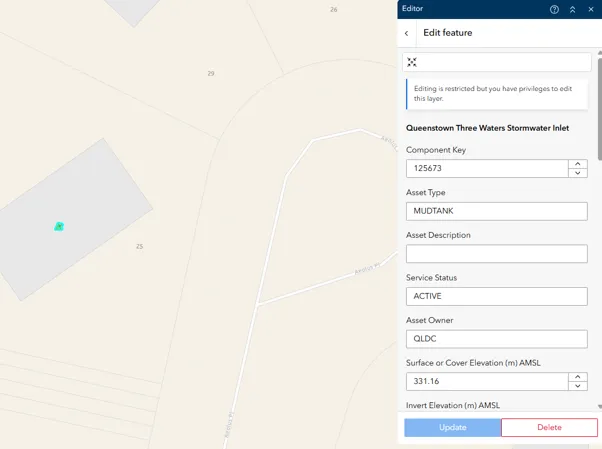
For bulk editing the features,
Select by rectangle — Click and drag to draw a rectangle and select intersecting features. Click on the three dots to edit the details.
Select by lasso — Click the map to create the vertices of a polygon, or draw with the pointer to create a freehand shape. Double-click to close the polygon and select intersecting features. Click on the three dots to edit the details.
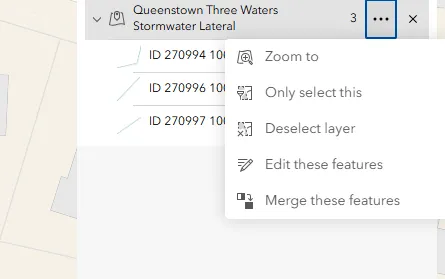
Once you select some features, all selected features appear in a list. You can only edit features from one layer at a time. If you select features from multiple layers, you can use the drop-down menu and the filter tool to narrow your selection to a single layer. You can also remove specific layers and features from the selected list. You can also zoom to each, only select, deselect, and edit each layer and individual feature.